Pre-accounting, done properly

Extraction gets you rows.
You needed finished work.

Most conversion tools read a PDF and hand you a spreadsheet of transactions. Then somebody spends the afternoon categorizing them against the client’s chart of accounts by hand, and checking whether the totals tie out. Kveldo does that part too — against that client’s own Chart of Accounts, with rules that learn, and a reconciliation you cannot override by accident.

Their chart, not a generic one

Every client has their own Chart of Accounts, never shared. AI suggestions are drawn only from that client’s accounts.

Rules that learn per client

Tick Memorize beside an account and every other matching transaction in the statement categorizes itself. Next month it is already done.

Reconciled to the penny

One-cent tolerance, and a statement cannot be accepted while out of balance. The check is not advisory.

Four export formats

CSV, XLSX, QIF, and an IIF built against real QuickBooks Desktop import behavior — not a guess at the spec.

Included, not billed

Conversion that does not meter your growth.

A busy month should not arrive with a bigger invoice. Statement conversion is part of the platform price, and what comes out the other end is already reconciled and already categorized against that client’s own accounts.

No per-page, per-client or per-credit charge

Convert one statement or four hundred. Nothing in the pricing punishes a heavy month, so nobody on your team has to think about cost before running a batch.

It has to reconcile before you can accept it

Opening balance, transactions and closing balance must agree to the penny, with a one-cent tolerance. A batch that does not balance stops and says so rather than quietly producing wrong books.

Categorized to that client’s own accounts

Not a generic chart. Rules you have already taught for that client resolve first, then exact and fuzzy matches on their own account names — so the export lands in the books instead of in a review queue.

The workflow

Six steps, and a person signs off on every one that matters.

It is reached from the client’s Accounting tab — never from a global menu — so a statement cannot be processed against the wrong client.

1

The PDF arrives

Your client uploads it through the portal, or your staff upload on their behalf. Either way it is already on the right client record.

2

Start the conversion

Click Convert on the statement, or tick Start conversion at upload. Whether that box starts ticked is your firm’s own preference.

3

Pick the Chart of Accounts

Use the client’s existing one in a click, or upload a new .xlsx or .csv. Accounts can also be added, edited and deleted by hand, row by row.

4

Watch it work

Extraction streams, and the screen shows it: a stage rail, a running count of transactions found so far, an elapsed flip-clock and a self-writing ledger page — rather than an opaque spinner. Long statements are supported end to end.

5

Review what needs you

Filter chips narrow to Unknown, Low Confidence or Needs Review, and the list sorts needs-review to the top. Marking a row reviewed keeps your scroll position instead of throwing you back to the top.

6

Accept, then export

Accepting locks the statement and shows what it returned your firm in hours and dollars, including the share your own memorized rules handled. Export files save automatically to the client’s Files, so a previously exported file is never regenerated.

How a transaction gets its account

Four tiers, and the AI is the last resort — not the first.

Three deterministic passes run before a model is asked anything. That is not caution for its own sake: the deterministic tiers are free, instant, and get more accurate the longer your firm uses the product, because they are built from rules you taught.

  1. 1. Memorized payee rule — a payee-to-account mapping you previously taught for this client
  2. 2. Exact account match — the cleaned payee name exactly matches an account name
  3. 3. Fuzzy match — a close match to an account name
  4. 4. AI suggestion — the model’s best pick, drawn only from this client’s specific Chart of Accounts

Results are labeled Auto (95%+ confidence), Suggested (80–94%, review recommended) or Unknown (under 80%, must be categorized by hand). A row added manually runs the deterministic passes only — no AI cost — and re-reconciles the batch automatically.
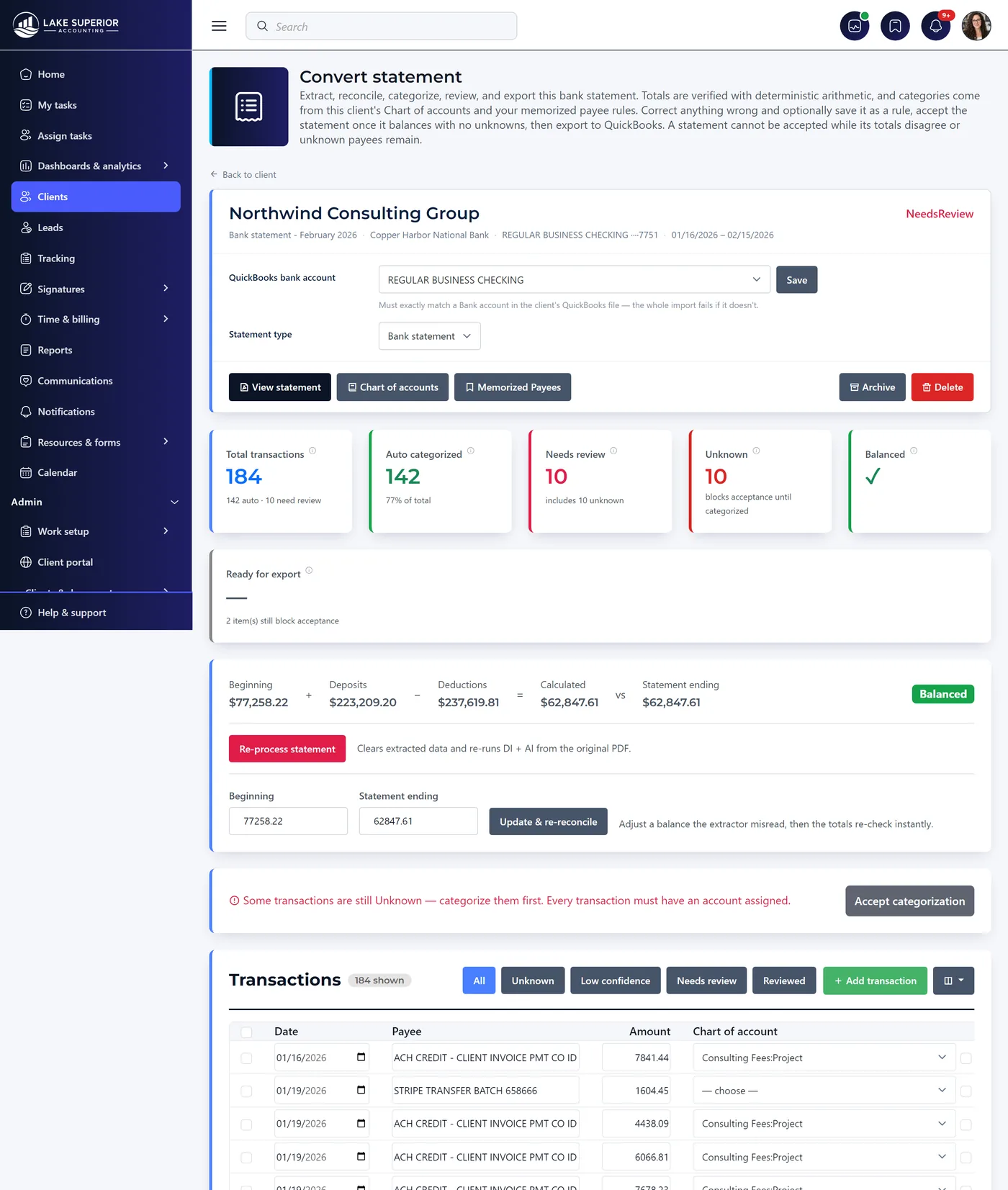
Review · 118 transactions
A converted bank statement under review: 184 transactions, 142 auto-categorized, 10 needing review and 10 unknown, with beginning balance plus deposits minus deductions reconciling exactly to the statement ending balance.
QuickBooks Desktop

The IIF export, specifically.

IIF is chronically badly implemented, and a bad IIF fails at import with an error naming nothing you can act on. Kveldo’s exporter is built against real QuickBooks import behavior rather than the published spec alone.

Complete double-entry

Each transaction exports as a TRNS + SPL pair, so it imports as a real double-entry transaction rather than a stub.

Payees defined up front

An !OTHERNAME block defines every distinct payee, so the import does not fail on an unknown entity halfway through the file.

Nothing lands in the print queue

A TOPRINT N column keeps check-type disbursements out of the to-be-printed queue, where they otherwise pile up silently.

Credit cards mapped correctly

Credit-card payments map to CCARD REFUND rather than the accounts-receivable PAYMENT type, which is where most exporters get it wrong.

IIF export requires you to confirm the QuickBooks bank account — chosen from a dropdown of the client’s bank accounts and prior names, with an add-new option — and the button stays disabled until you do. The exporter never falls back to the AI-extracted statement header text, which is usually the account holder’s name and is not a real QuickBooks account. That single fallback is the reason a lot of IIF imports quietly create garbage.

Measured, and reviewed

A number with its sample beside it,
and a person who approves the result.

98.5% first-pass accuracy, across a 2,850-statement pilot

Ours is 98.5% first-pass accuracy, across 2,850 real bank statements put through the product by firms working in production. Both halves matter: the sample size, because a percentage without one is a claim rather than a measurement, and first-pass, because it counts only the results that came back needing no human correction at all. These were real documents rather than a synthetic test set, and it is a pilot measurement rather than a promise about your next batch. This is an aggregate across bank formats rather than a figure per format; we said we would publish it per format and we still intend to, once there is enough volume behind each one to mean anything. And it matters less than the reconciliation check beside it, which is what catches the rest.

The review step is the product, not a limitation

Every AI output here is a suggestion a person approves. The model extracts and suggests; deterministic code does every calculation and every reconciliation. Account numbers are masked before any statement text reaches a model, and only transaction text and account names are sent — never full client PII. In this profession that is a feature.

Convert one of your own statements this afternoon.

Free for 14 days, no credit card. Bring a real statement and a real chart of accounts — a demo file proves nothing. If it does not handle your bank’s format, we would rather know that too.