The question nobody else answers

A $450 monthly bookkeeping client
who takes 11.9 hours.

That is $37.82 an hour. If your fully-loaded cost is higher than that, the engagement is losing money — and most firms find out years late, or never, because nothing they own does the arithmetic.

Kveldo does. Set a work item’s fee basis to fixed fee, enter the agreed fee, and the effective hourly rate appears in Time Reports beside the cost and the margin. It is the same numbers your utilization and realization reports read, because there is one set of entries underneath all three — never a second set that can disagree.
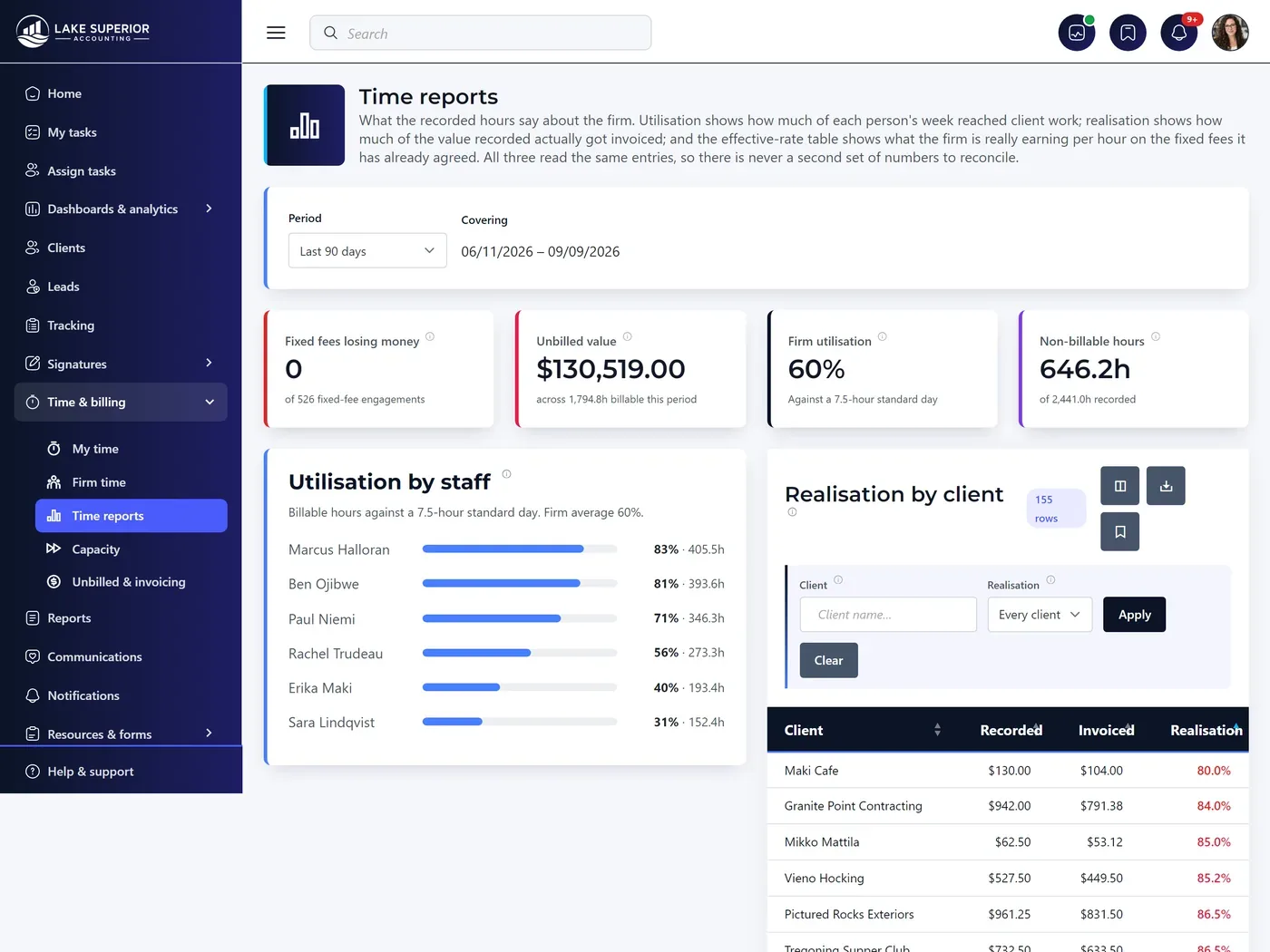
Effective hourly rate · fixed fee
The effective hourly rate report for a fixed-fee engagement, showing the agreed fee against hours actually spent and the resulting rate per staff member, including a write-down.
Recording time

The timer runs on the server, not in your browser.

Close the tab, shut the laptop, move to another machine — none of the elapsed time is lost. Stopping always saves even without a description, because the work happened and losing it is the worse trade. Starting a second timer banks the first rather than discarding it.

Type it however you think it

The duration box accepts 1.5, 1.5h, 1:30, 90m, 1h30 or 2. When it cannot read what you typed it asks rather than guessing — because a guessed duration becomes a wrong invoice.

Both numbers are kept

Your firm sets a rounding increment; six minutes by default. Kveldo stores what actually elapsed and what bills after rounding, so you can change the policy later without losing the truth — and a client asking why a two-minute email shows as fifteen has an answer.

Internal time still counts

Admin, CPE and business development are recorded with no client attached — and still carry a cost, which is what makes the margin reports possible at all.

The rate card

“Why was I charged $120 an hour?”
should be one click away.

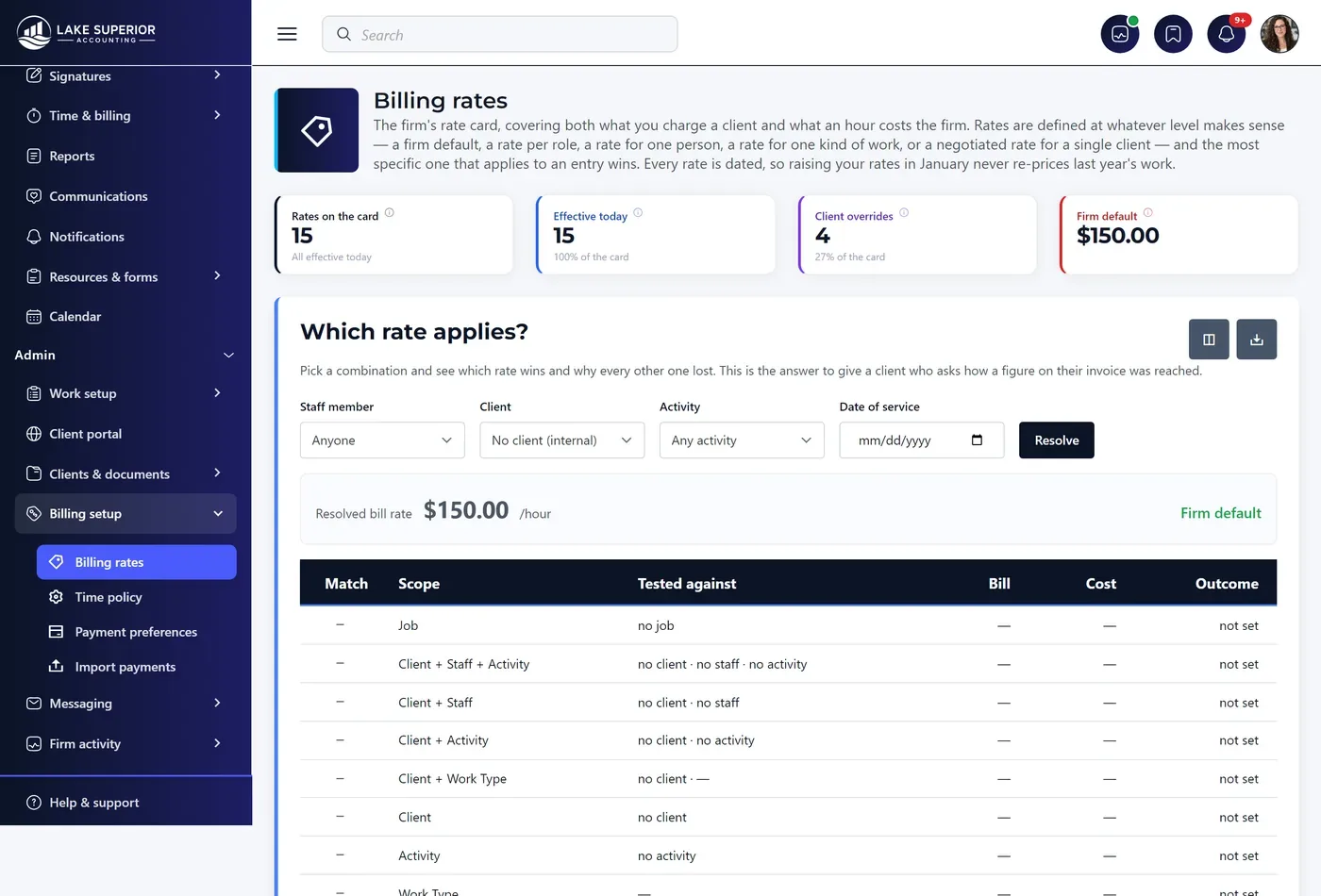
Rates can be set at a firm default, a role, one person, an activity, a kind of work, one client, one client and person, one client and activity, or a single job. The most specific rate that applies always wins — and a Which rate applies? panel shows you the winning rate and why every other rung lost.

  • Rates are dated. When an entry is saved, the rate in force on the date of service is copied onto it and never looked up again — which is what keeps a two-year-old invoice reproducible, and why raising rates in January never re-prices last year’s work.
  • Bill rate and cost rate are separate. The cost rate is never shown to a client and resolves independently, so a client override never wipes out what the hour costs you.
  • A rate naming a role you no longer have is left alone and marked as such. Kveldo never rewrites a stored rate to a different role, because a rate is a price your firm agreed.
  • The firm default cannot be deleted. Without one, entries can resolve to no rate at all — which reads on screen as free work.
Which rate applies?
The rate resolution panel, showing which of five possible billing rates applies to an entry and why the most specific one wins.
The week, and the invoice

Approved time becomes an invoice without being retyped.

Submit, approve, lock

The Week view lays out one row per client-job-activity and one column per day. Submitting checks first: if your firm requires descriptions, any billable entry without one blocks the submission and says how many need fixing. A Manager approves — entries lock and cannot be edited behind an invoice — or sends the week back editable with a note.

A reopened entry is recorded as reopened rather than changed silently. Billed time can never be reopened at all: once time is on an invoice it is a financial record, and reversing it means crediting the invoice rather than editing history.

Unbilled & invoicing

Four tiles open the screen: unbilled work, how much is older than 60 days, realization over the last 90 days, and how many clients are ready to bill. Pick a client, untick anything you are not billing yet, choose how the invoice groups the lines, adjust the total up or down, check the preview, and create it.

A write-down is spread proportionally back across the individual entries and stored on each one — which is what lets realization be reported by client, by staff and by activity. Kept only on the invoice it would be one number and no analysis.

Two small decisions you will never notice, until they save you.

The invoicing entry list deliberately never pages, because each row’s Bill tick belongs to the invoice form and a paged list would have quietly submitted only the visible page — leaving later entries off the invoice with nothing on screen to say so. And the Bill column does not sort, because sorting by tick state would move rows around while somebody was still choosing them.

Capacity planning

Every other report looks backwards.
This one says who is about to drown.

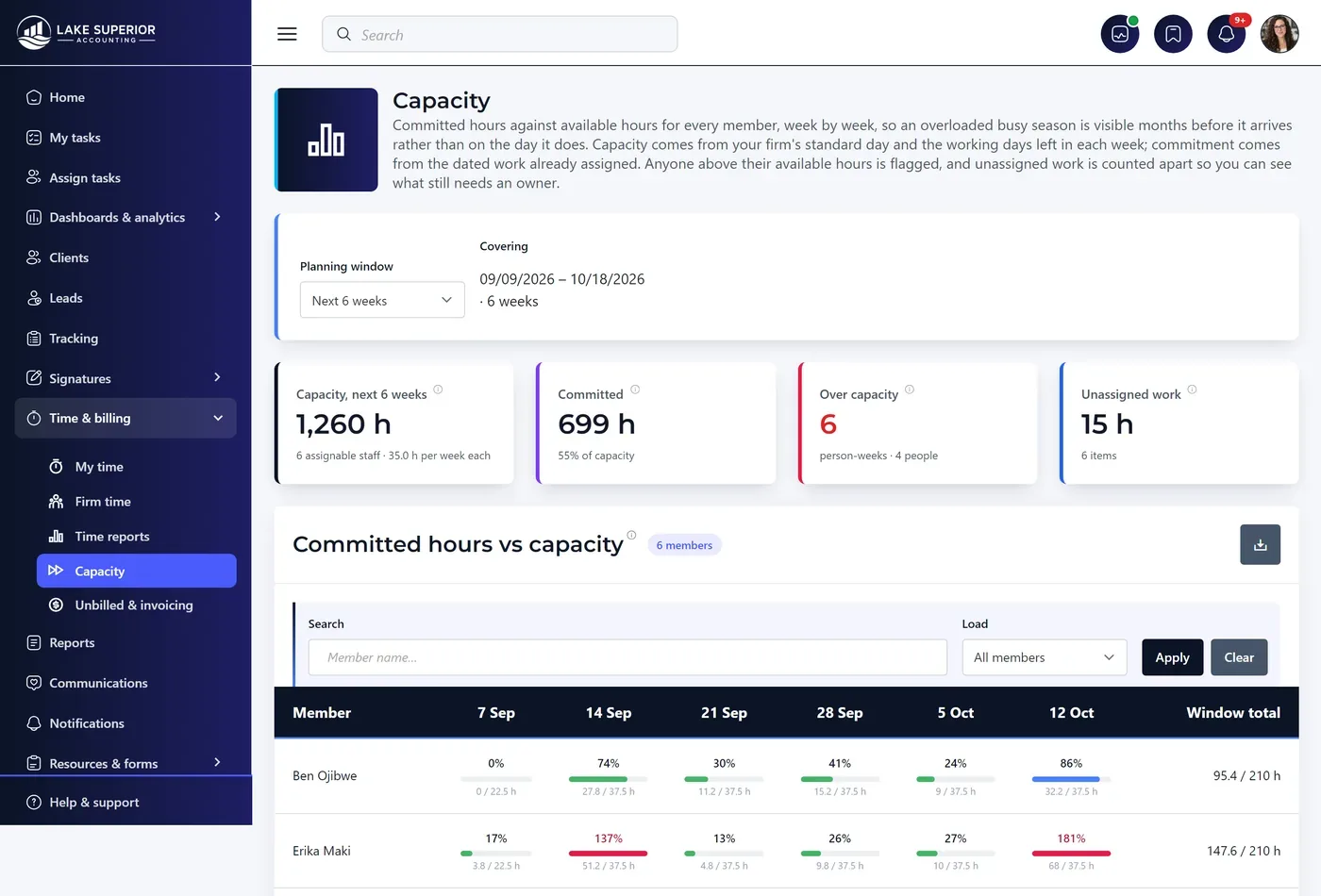
Capacity answers the question no other screen answers: is anyone going to be overloaded next month. One row per person, one column per week, and three bands — under 85% (room), 85–100% (full), over 100% (the week will slip).

  • Range is the only filter: next 6 weeks, next 12 weeks, or to 15 April
  • Available hours count only the working days still ahead, so a Wednesday reading is not flattered by Monday and Tuesday having already been worked
  • Four tiles: total capacity, committed as a percentage of it, how many person-weeks are over — and unassigned work, the dated hours with nobody’s name on them
  • The number is always printed beside the bar, so color is never the only carrier of meaning
  • A scheduled departure removes that person’s remaining weeks from the forward view the moment it is recorded

Estimates resolve in four steps and the panel below the matrix names which rung each work type landed on: the job’s budgeted hours, then your firm’s own measured average across completed work of that type, then the work type’s default estimate, then a standard day. The source column reads 14 completed, or no history — default, or no history — no default set — because a default nobody has checked looks exactly like a measured average once it is inside a total.

Capacity · next 12 weeks
The capacity matrix: committed versus available hours per staff member per week, with weeks over 100 percent flagged as at risk of slipping.

Time tracking your staff will actually trust.

No screenshots. No keystroke counting. No idle-screen monitoring. No productivity scoring. And no setting to switch any of it on — not for an administrator, not for a partner, not for us.

Time here measures work, not people. Your staff will find that out on their first day, and it changes whether the numbers you get back are honest. Clients never see hours, timesheets, rates or utilization either — what reaches a client is the invoice, carrying the description your firm approved.

Find out what your fixed fees are really earning.

Free for 14 days, no credit card. Time, billing and capacity are on every plan — including the $79 one.