Electronic signature

A tax firm signs hundreds of things each spring.
None of them should carry a meter.

Most practice-management vendors either meter signature envelopes or bundle a third-party signing service and pass its cost through to you. Both mean the same thing in March: a number going up while you work. Kveldo Sign is built into the platform, and there is no per-envelope fee, no envelope allowance, and nothing metered. Send as many as the season needs.

No per-envelope fee

Included on every plan, from Solo upward. Nothing counted, nothing capped, nothing billed by the signature.

No account for signers

Your client gets a secure single-use link. No Kveldo login to create, no code to enter, nothing to install.

It files itself

The executed PDF and its Certificate of Completion land in that client’s Documents automatically, visible to them.

Cryptographically sealed

Every executed document is sealed the moment the last signer finishes — verifiable with standard tooling by somebody who does not want to take your word for it.

Sending an envelope

From a PDF on a client record to a signature request, in one flow.

Any PDF in a client’s Documents carries a quill icon. Click it and you are in the send flow — the document is already attached to the right client, which is the mistake this design exists to prevent.

1

Add your recipients, and say what each one is for

Every recipient gets a name, an email, an optional phone and a role. A Signer must sign — the envelope cannot complete without them. An Approver must accept but fills in no fields. A CC receives the completed document and never blocks anything. Recipients sign in the order listed, unless you untick sequential signing.

2

Place the fields on the page

Pick a recipient, pick a field type — Signature, Initials, Date, Text or Checkbox — then click the page where it belongs. Each recipient gets their own color. Fields drag to move and hover to remove. Kveldo draws the document’s real text in its real positions at the real page size, so you can aim a signature block precisely rather than guessing against a picture of the page.

3

Save the layout once, use it for every client

Saved layouts store positions, not people: fields are tied to the first recipient, the second recipient and so on. One engagement-letter layout works for your whole client list. Applying a layout asks before it replaces what is already placed.

4

Set an expiry and send

Choose the envelope type — which sets the signature block and the wording of the invitation — write the subject and message, set how long it stays open, and send. Reminders and expiry run themselves from there.

Three routes, one record

However your client signs, the certificate says which.

The emailed link

A plain page: the document title, a button to read it, your message, the consent disclosure, anything you asked for, and their signature. They can type their name or draw it with a finger, stylus or mouse. No account, no code.

Signed in the portal

If the recipient’s email matches a portal account, the request also appears under Signatures there. This is the strongest of the three, because portal accounts carry mandatory two-factor authentication — and the Certificate of Completion records it as such.

Signed in person

Hand your own device to a client sitting across the desk. The signature is recorded as signed in person with the witnessing staff member named on the certificate — and the emailed link stops working the moment you do it, so no live link sits in an inbox afterwards.

Engagement letter season

Write the letter once. Send it to a segment. Check the list first.

Letters and layouts writes an engagement letter with merge fields in double braces — {{client_name}}, {{fee}}, {{period}} — filled from each client’s own record. Bulk send picks a segment (a service enrollment, or all active clients), the letter, and how long the envelopes stay open.

Then it runs a dry run, and nothing is created until you have looked at the list. Every client appears with their signer and their merged fee, and one of three results.

  • Ready — will send
  • Blocked, with the reason: no contact email, no fee on the service enrollment, not enrolled in any service. Listed first, so problems are not buried under successes.
  • Duplicate — already has a live envelope, skipped unless you untick it

Kveldo never guesses a missing value. A client with no fee recorded is reported and skipped rather than sent a letter with a blank or an invented number in it. Download the error report as a CSV, fix the rows, run it again.
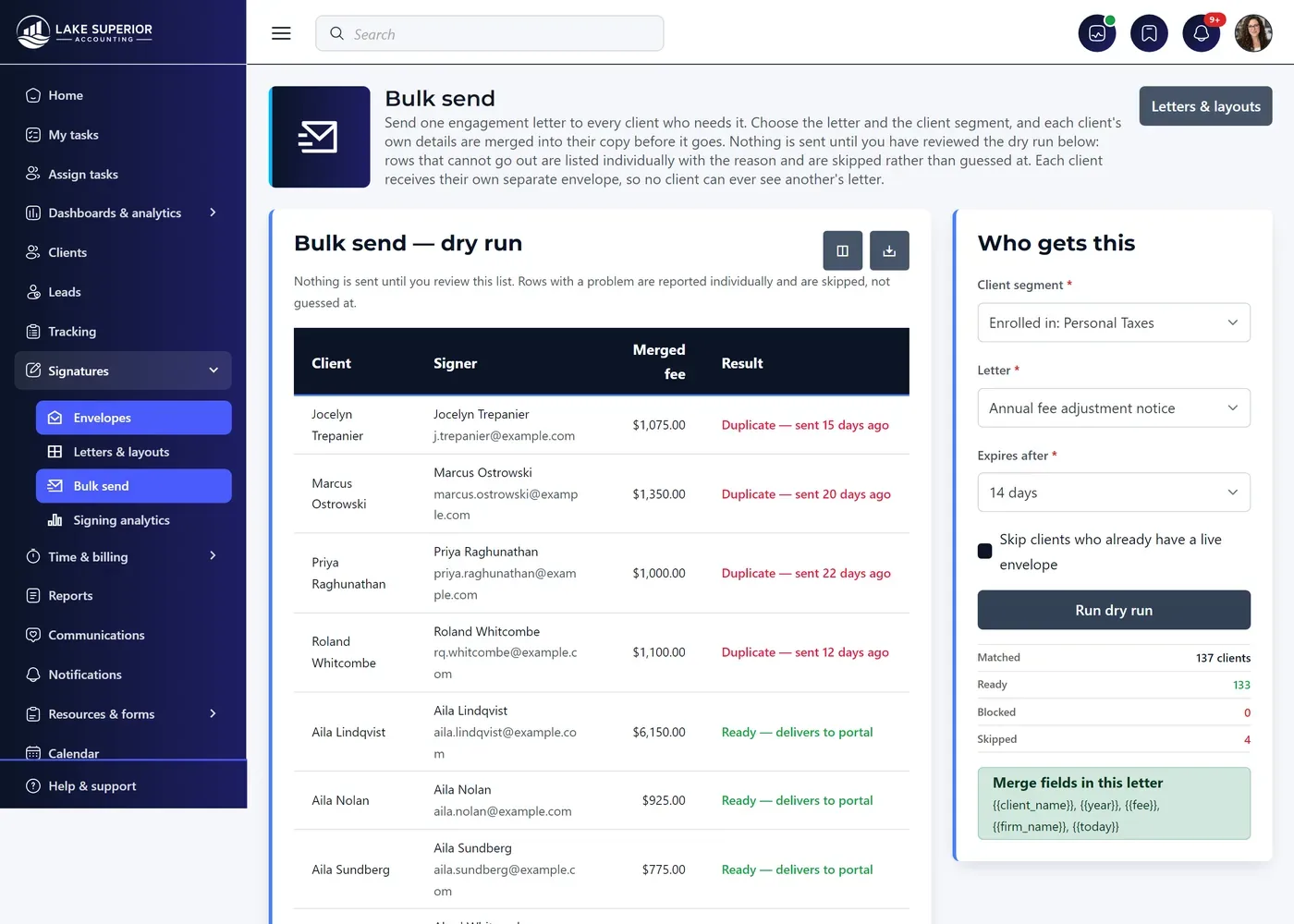
Bulk send · dry run
A bulk e-signature send shown as a dry run before anything is sent: 137 recipients matched, 133 ready and 4 skipped as duplicates, each with its reason.
Completion

What you are holding when the last signer finishes.

The executed document

Your original PDF with each signature stamped exactly where it was placed, and an envelope reference in the footer of every page.

The Certificate of Completion

Each signer’s name, email, signature, Sent / Viewed / Signed times, IP address and browser, how they authenticated, the disclosure version they accepted, and the full chronology in your firm’s stated time zone.

The digital seal

A small staff-only file filed beside the executed PDF. It proves the document has not changed by a single byte since we sealed it — evidence for a dispute rather than something a client needs in their file list.

Signing an 8879 in person, on your own device.

IRS Forms 8879 and 8878 and their state equivalents are signed in person, with the client in front of you — which IRS Publication 1345 exempts from the remote-transaction identity rules that apply to third-party knowledge-based verification. That is a fact about the regulation rather than a workaround, and it is how a great many practices already collect them. Everything else your firm sends for signature runs through Kveldo Sign as normal.

Tracking

Every envelope in the firm, on one screen.

The Signatures portfolio counts what is out for signature, what needs attention (declined, or expiring within 48 hours), what completed this month, and the average time to sign. The tiles describe every envelope rather than the filtered view, so they hold still while you narrow the list.

  • Filter by search, status, client and envelope type; sort by Expires to put the urgent first
  • Each envelope has its own page: progress, every recipient’s status, and how they authenticated
  • A full audit trail — every view, consent, signature, decline, reminder and void, with timestamps and IP addresses
  • A document fingerprint captured at send, so any change between send and sign is detectable
  • A Signing report across the firm: completion rate, decline rate, time-to-sign, and where envelopes pile up
Reminders, expiry and voiding

The chasing runs itself.

An hourly job reminds whoever the envelope is waiting on once it is within 48 hours of expiring, at most once a day — never somebody who has already signed, and never a CC recipient. You can always remind by hand.

  • Expiry closes an envelope whose deadline passes; the links stop working
  • Void cancels one that should not be signed, notifies everyone outstanding, and cannot be reopened
  • Voiding is not deleting — the envelope and its audit trail are kept, because the record that something was sent and withdrawn is itself worth having
  • Signed records are kept for seven years from completion, and the retention date is stamped when the envelope is created — so a later policy change never re-dates envelopes already in flight

Send your first envelope this afternoon.

Free for 14 days, no credit card. Unlimited envelopes on every plan, including the $79 one — there is no signature tier to upgrade to.