The Full Platform

Every Feature Your Firm Needs.
One Flat Price. Zero Module Math.

Kveldo is a complete accounting practice management platform. One platform where everything is connected and everything is included at your plan tier.

Client Management

A Single Source of Truth
for Every Client

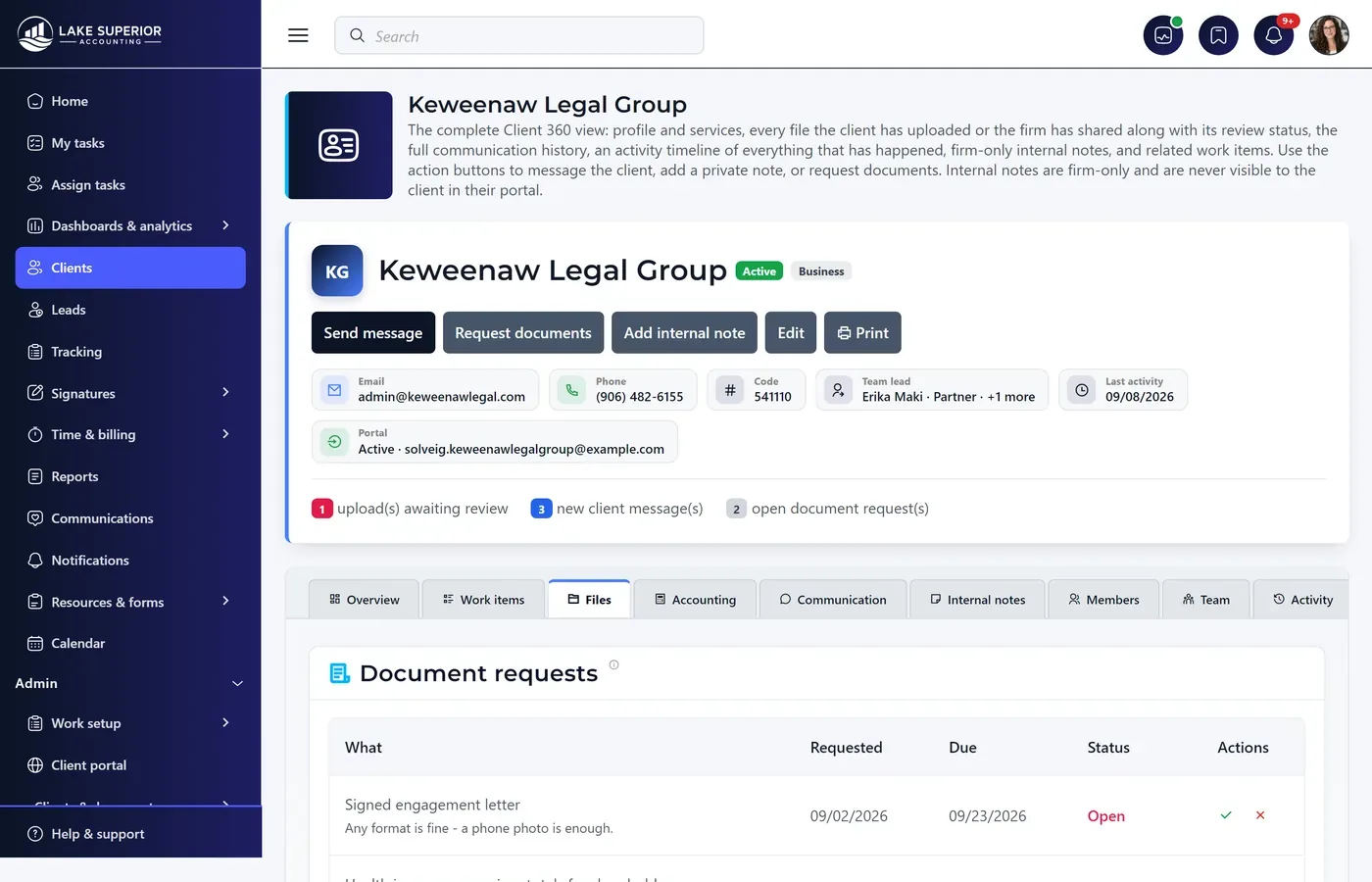
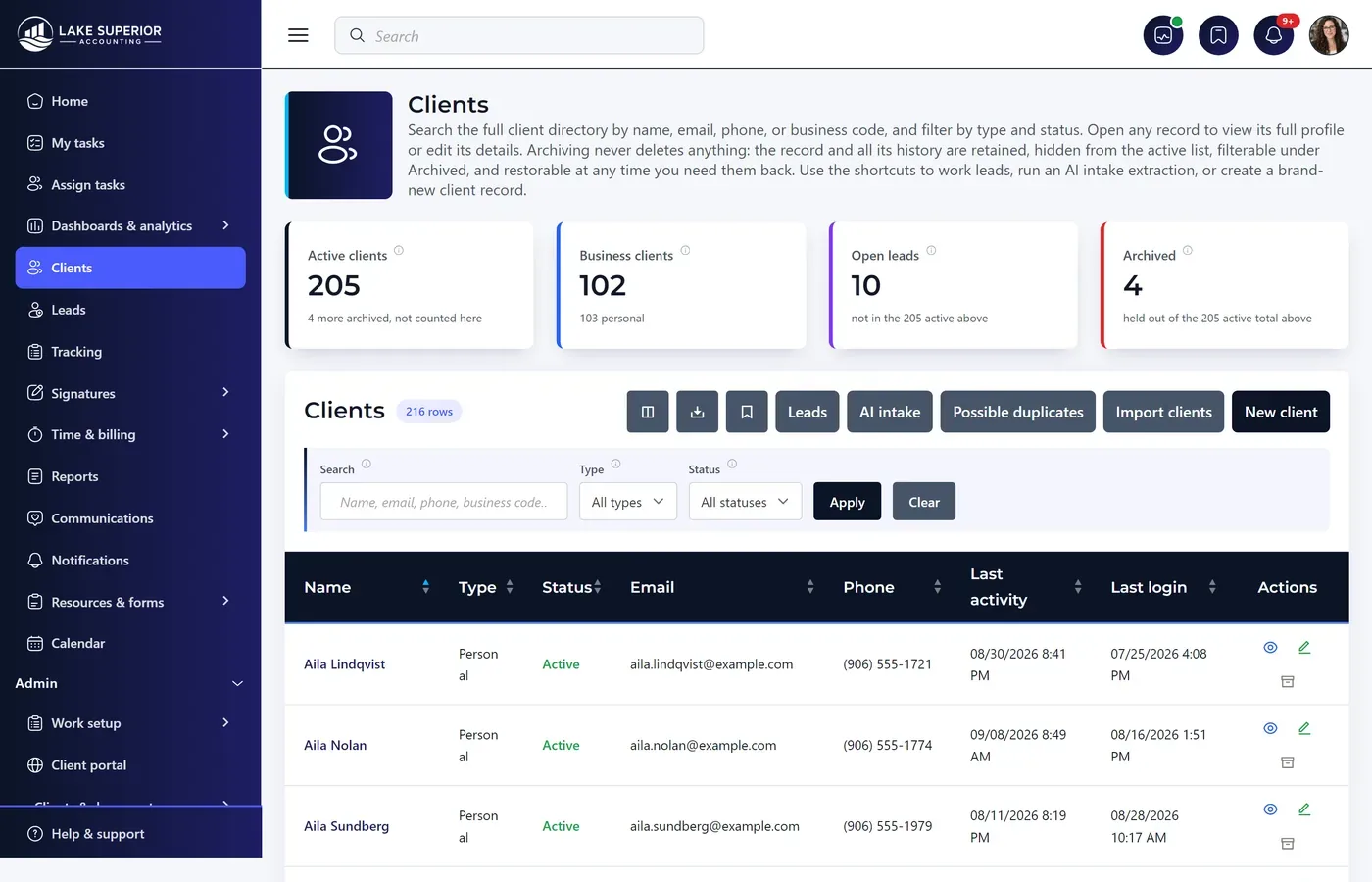
Every client record in Kveldo is a complete, searchable profile. Entity type, business vs. personal, contacts, fiscal year, document history, work history, message history — all in one place, all connected.

  • Business and personal client types with distinct data models
  • Custom tags and client grouping for firm-specific segmentation
  • Full contact directory per client (owners, spouses, contacts)
  • Import via CSV from your existing software or Excel
  • Client activity timeline: every upload, message, and status change
  • Bulk actions: bulk document requests, bulk reminders, bulk status updates
  • Search across all clients by name, EIN, email, or tax year
Clients
The client list for an accounting firm: 205 active clients split between business and personal, each row showing client type and the staff member assigned.
Client Portal

The Portal Your Clients
Will Actually Use

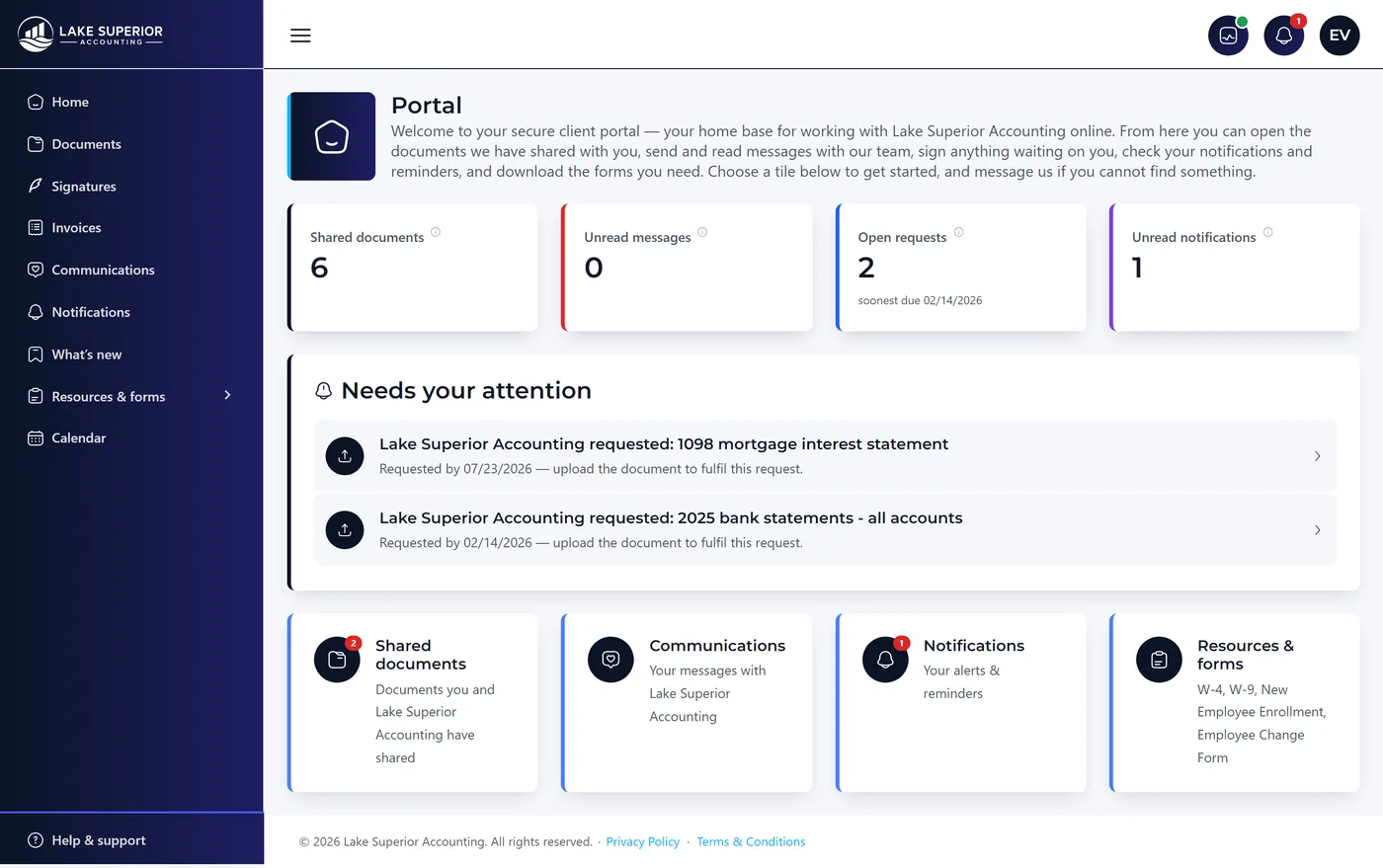
The category's most universal complaint is that clients will not use the portal. Kveldo's answer is not a shortcut around the login — it is what sits behind it. Your client is invited by email, sets a password once, enrols an authenticator, and then “remember this device” keeps them signed in for 30 days at a time on their own phone. What they land on is a single needs your attention panel, not your firm's internal complexity.

  • Invitation-only access under your firm’s brand, on your own domain at Premium
  • Mandatory two-factor authentication — the compliance answer, not a compliance risk
  • Photo-to-PDF capture from any smartphone camera
  • Document upload with automatic organization by category
  • Document request status: Requested → Received → Reviewed
  • Unlimited client seats — always free at every plan tier
  • Branded portal with your firm's colors and logo (Firm plan)
  • Works on all devices — desktop, tablet, and smartphone
Client portal
The client portal as a client sees it, carrying the firm’s own branding: a needs-your-attention panel listing the two documents the firm has requested, with shared documents, messages and notifications alongside.
Bank Statement Conversion

A PDF Statement In.
A Reconciled QuickBooks File Out.

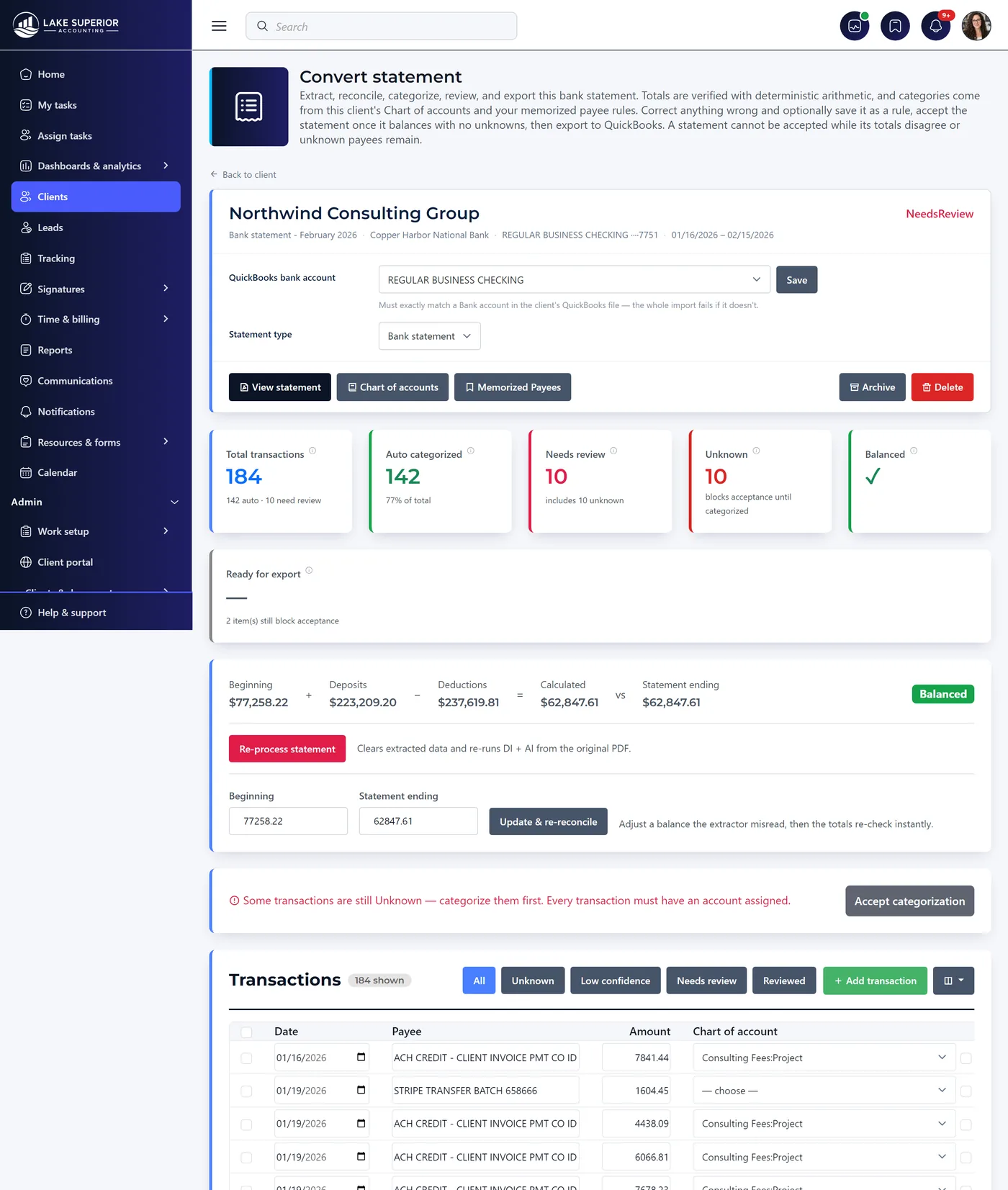
AI extracts and suggests; your staff verify and approve. The engine reconciles to the penny with a one-cent tolerance, and a statement cannot be accepted while it is out of balance — so a misread amount is caught immediately rather than three months later.

  • Four-tier categorization: memorized payee rule, exact match, fuzzy match, then AI — drawn only from that client's own Chart of Accounts
  • Confidence bands shown, not hidden: Auto above 95%, Suggested 80–94%, Unknown below 80% and categorized by hand
  • Live progress while extracting — a stage rail, a running transaction count and an elapsed clock, not an opaque spinner
  • Bank, credit card and brokerage statement types, with the sign inversion credit cards need
  • Add a missed transaction, correct a misread amount, and the batch re-reconciles instantly
  • Tick “memorize” beside an account and the payee rule teaches itself for next month
  • Export as CSV, XLSX, QIF or IIF — every export saved to the client's Files tab for re-download
  • Retry cannot start a second concurrent extraction, so you are never double-billed for one statement
How the extraction works
Statement conversion · review
Statement conversion review: 184 transactions with 142 auto-categorized against the client’s own chart of accounts, and the totals reconciling to the penny.
Work In Progress Board

Your Firm's Workflow.
Your Rules. Your Status Codes.

Kveldo uses your firm's actual status codes. If your firm uses "Waiting on EIN," "In Review," and "Delivered" — that's what your WIP board shows.

  • Kanban view: drag-and-drop cards between custom status columns
  • List view: tabular view with sortable columns for bulk management
  • Business vs. personal engagement separation
  • Assignee tracking: assign each work item to a staff member
  • Tax year filter: switch between current and prior year views
  • Engagement type labels: 1040, 1120, 1120S, 1065, W-2, payroll, etc.
  • Bulk status update across multiple clients simultaneously
Work tracking
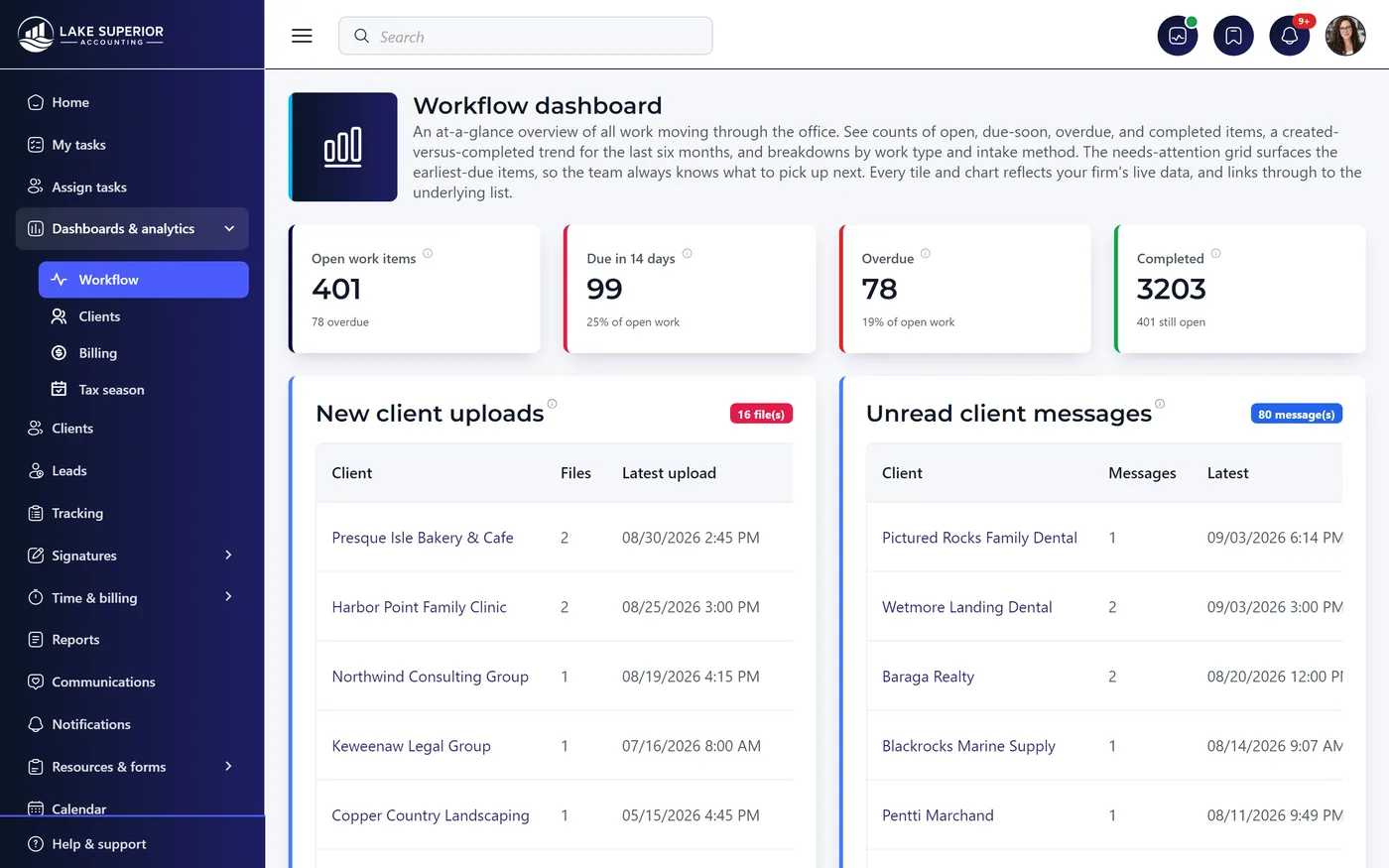
The workflow dashboard: 401 open work items, 99 due within 14 days, 78 overdue and 3,203 completed, beside lists of new client uploads and unread client messages.
AI Intake Extraction

AI That Reads Your Intake Forms
Before You Do

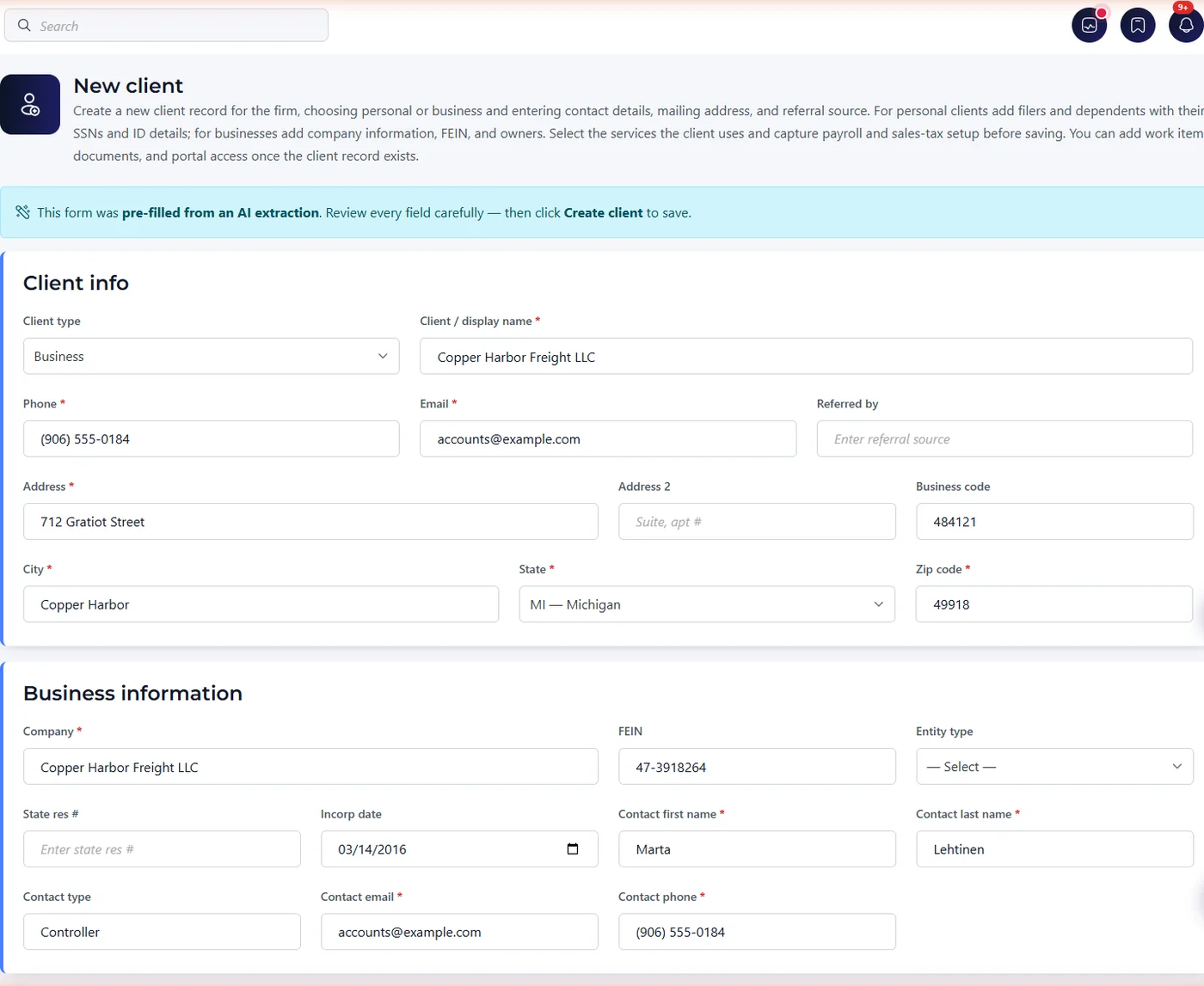
Upload a W-9 or Company Info form. Thirty seconds later, the name, EIN, entity type, address, and fiscal year are pre-filled in the client record — waiting for your review and approval. No manual data entry.

  • Supported forms: Company Info, Personal Tax Intake, W-4, W-9
  • OCR + large language model extraction pipeline
  • Handles clean digital forms as well as handwritten and scanned documents
  • Review-then-save: AI pre-fills, you approve — nothing saves automatically
  • Confidence indicators on each extracted field
  • Audit trail: every AI extraction is logged with timestamp
  • Available on Team and Firm plans — no extra charge
AI intake · pre-filled for review
A new client record opened straight from an AI extraction: a banner states the form was pre-filled from an AI extraction and asks staff to review every field before saving, above the company name, phone, email, address and business code already filled in.
Document Vault

Every Document. Encrypted.
Organized. Tracked.

Every document your clients upload is encrypted at rest using AES-256. Every document request you send is tracked with a clear status chain. No more searching your inbox for that W-2 Mrs. Johnson "definitely sent last week."

  • AES-256 encryption for every document at rest
  • Document categories: W-2s, 1099s, ID, bank statements, prior returns
  • Document request flow with status: Requested → Received → Reviewed
  • Automated reminders for outstanding document requests
  • Bulk document requests to multiple clients at once
  • Version history: track document revisions when clients re-upload
  • Preview in-browser — no downloading required
Files · Copper Country Landscaping
A client’s document vault, filed by category, with bank statements, exports, tax documents and client uploads distinguished and staff-only files marked.
Deadline Calendar

Every Deadline. Every Client.
One Calendar.

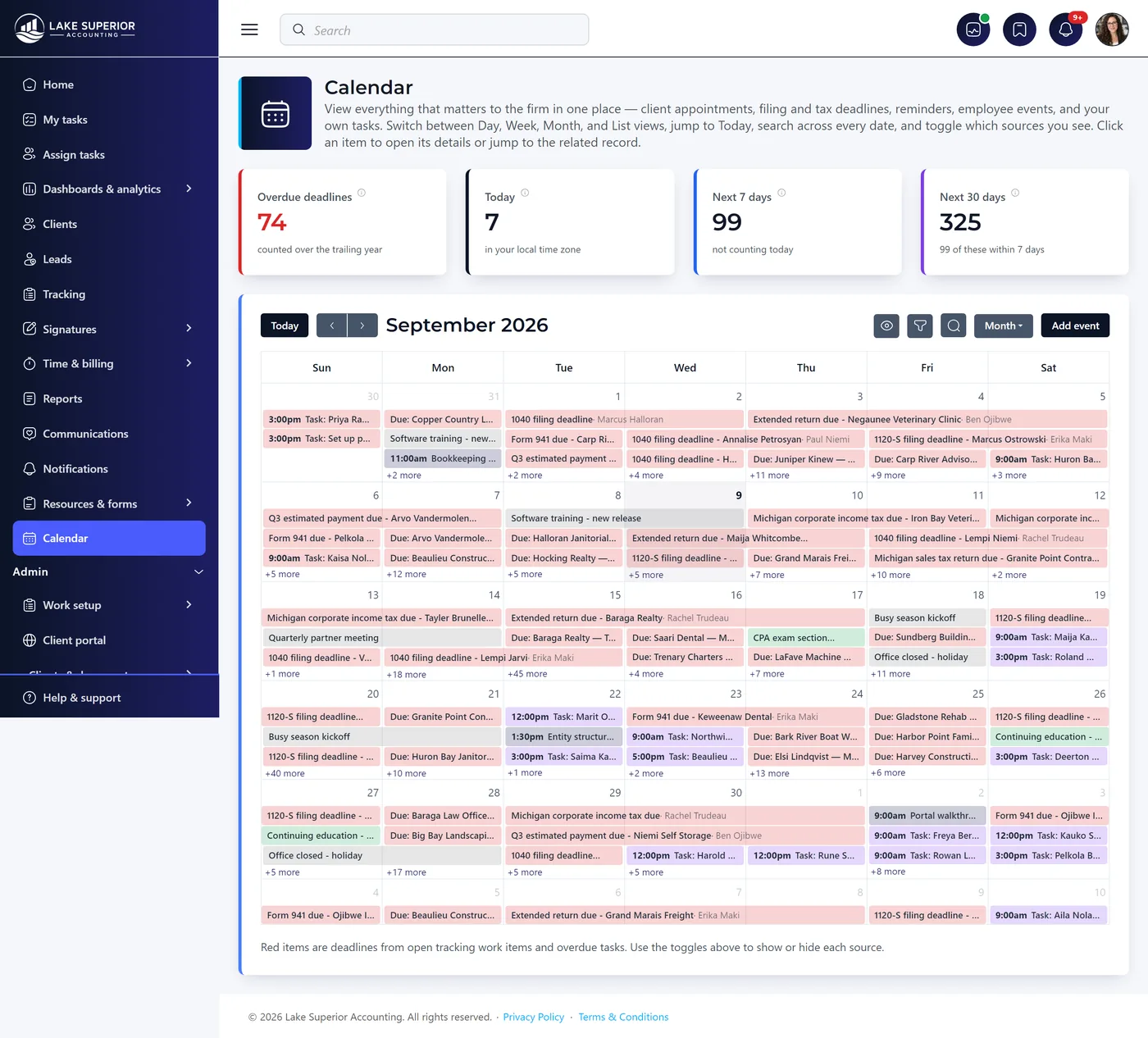
Tax filing deadlines, extension dates, quarterly estimated payments, payroll due dates — all in a single calendar connected to the client record, with automated reminders before each deadline.

  • Pre-loaded federal tax deadlines: 1040, 1120, 1120S, 1065, 990
  • Extension tracking: automatic deadline update when extension filed
  • Client-linked deadlines: view all deadlines for a specific client
  • Automated client reminders by email before a deadline
  • Staff reminders: internal alerts for upcoming due dates
  • State tax deadline library (major states)
  • Calendar export to Google Calendar and Outlook
Calendar · next 30 days
The deadline calendar showing upcoming tax deadlines, client events and firm-wide dates for the next 30 days.
Secure Messaging

Stop Emailing SSNs.
Start Messaging Securely.

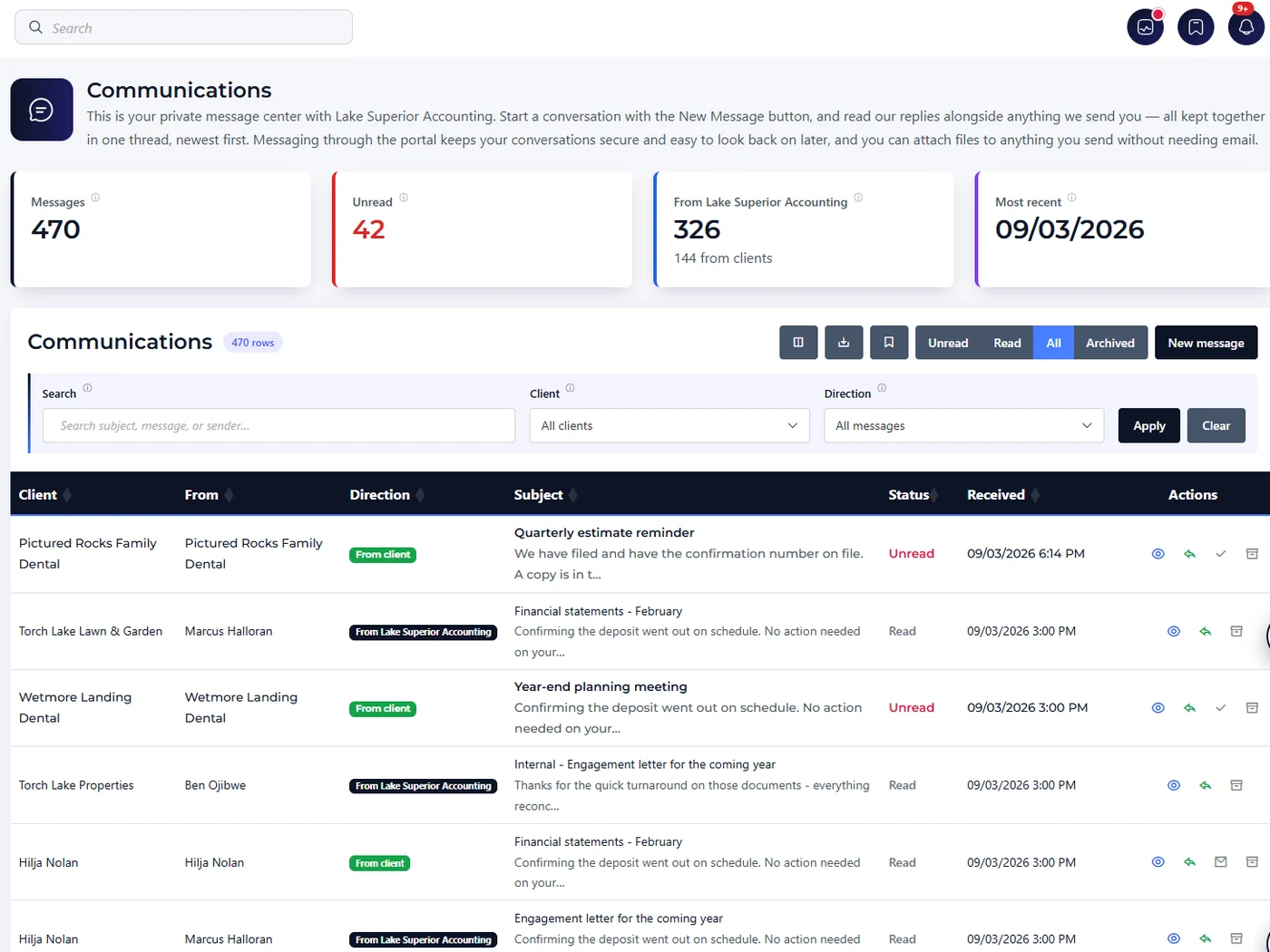
Secure, encrypted messaging between your team and each client — inside Kveldo, not in someone's inbox. Email notifications pull clients back into the portal whenever a new message arrives.

  • Threaded conversations per client — full history in one place
  • Message content stays in the portal — the notification goes to their inbox, the message never does
  • Email notifications for new messages
  • Internal team notes: comments only your staff can see
  • Attach documents directly in messages
  • Message templates for common requests and reminders
  • Read receipts: see when the client viewed your message
Communications
The firm-wide message center: 470 messages with 42 unread, 326 sent by the firm and 144 from clients, above a filterable table showing each client, who sent it, the direction, the subject and whether it has been read.
The rest of the platform

And everything that came after launch.

The sections above are the headline capabilities. These are the ones firms discover in week two and then cannot do without — all included, none sold as a module.

Four operational dashboards

Workflow, Clients, Billing and Tax Season — each with stat tiles, trend charts, breakdowns and a needs-attention grid. Every KPI is clickable through to the exact filtered list behind the number.

Bookkeeping & sales tax grids

Year-at-a-glance views where each row is a client and each column a month. Set a cell's status inline and it saves instantly, color-coded by your firm's own status codes.

Client invoicing

Invoices tied to a client and service with line items, filters by status and date, mark-as-paid, a print stylesheet and PDF generation. Optional Stripe integration for online payment.

Automated client reminders

Escalating document chasers that stop automatically the moment the client uploads. Target a single client or every client enrolled in a service, with a Preview Recipients button that resolves the real list.

Leads pipeline

A lightweight CRM for prospects: stages with full change history, assigned staff, services of interest, and one-action conversion to a full client record with notes carried over.

Employees & payroll tracking

Employee records, payroll enrollment with encrypted SSN and pay rate, pay periods and run history. Kveldo tracks the data for management and reporting — it does not process payroll.

Help center, glossary & assistant

A screenshot-rich help center with full-text search, a searchable A–Z glossary of ~174 terms, and an AI assistant grounded in that documentation — separate corpora for staff and clients.

White-label & branding

Your logo, brand colors, product name and assistant name across the portal, emails and PDFs. Run on a Kveldo subdomain, or on your own domain with your own email sending domain.

Firm-configured everything

Work types and their allowed statuses, default assignment rules, recurring task schedules, services, document types, custom fields, notification templates and the tax calendar — all yours to edit.

Security Architecture

Security That Meets Your
FTC Safeguards Obligations

The FTC Safeguards Rule applies to tax preparers, CPAs, and bookkeepers who collect financial information from consumers. Kveldo is designed from the ground up to support your compliance obligations.

AES-256 Field Encryption

SSNs, EINs, driver's license numbers, and bank account data encrypted at the field level before storage. Not just disk encryption — field-level encryption.

UI Data Masking

Sensitive fields display as ••••••7890 throughout the entire UI. No raw SSNs are ever visible on screen, in logs, or in reports.

Multi-Tenant Isolation

Each firm's data is isolated beneath the application, by the data layer rather than by application code somebody has to remember to write.

Immutable Audit Trails

Every data access and change is logged with timestamp, user, action, and affected record. Audit records cannot be edited or deleted through any screen in the product, by anyone, including us.

Enterprise cloud hosting

Geo-redundant backup, encryption in transit, and regional data residency options.

WISP & FTC Safeguards

Architecture specifically designed to support your Written Information Security Plan requirements under the FTC Safeguards Rule for financial institutions.

At a Glance

Features by Plan

Sixteen capabilities, and every one of them is on every plan — including the $79 one. Capacity moves between plans; capability does not.

Feature Solo $79/mo · 1 staff Team $199/mo · 5 staff Firm $399/mo · 15 staff Premium $699/mo · 25 staff
Included on every plan all sixteen, on all four
Secure client portal, unlimited client usersIncludedIncludedIncludedIncluded
Bank statement conversion to QuickBooksIncludedIncludedIncludedIncluded
Kveldo Sign — unlimited envelopes, no per-envelope feeIncludedIncludedIncludedIncluded
Time & billing, rate card, timesheet approvalIncludedIncludedIncludedIncluded
Client invoicing, payments & receiptsIncludedIncludedIncludedIncluded
AI intake extractionIncludedIncludedIncludedIncluded
WIP board with your own status vocabularyIncludedIncludedIncludedIncluded
Four operational dashboardsIncludedIncludedIncludedIncluded
Monthly bookkeeping & sales tax gridsIncludedIncludedIncludedIncluded
Roles your firm authors, teams, client scopingIncludedIncludedIncludedIncluded
Capacity planning & offboardingIncludedIncludedIncludedIncluded
ROI measurement — what we returned you, monthlyIncludedIncludedIncludedIncluded
Portal in your logo and brand colorsIncludedIncludedIncludedIncluded
Client email sent from your domainIncludedIncludedIncludedIncluded
Mandatory 2FA, encrypted PII, full audit trailIncludedIncludedIncludedIncluded
Client import, help center & AI assistantIncludedIncludedIncludedIncluded
What your plan changes capacity, and two white-label rows
Staff seats151525
Client portal usersUnlimitedUnlimitedUnlimitedUnlimited
AI tokens included / month2M6M9M12M
Your own domain — app.yourfirm.comNot includedNot includedNot includedIncluded
Full white-label — no Kveldo mark anywhereNot includedNot includedNot includedIncluded

Two rows are crossed, and that is the whole list. Every entitlement above is checked on the server at the moment the action happens — not merely hidden in the interface — and a test fails our build if a capability ships without one.

Start your free trial.
The whole platform, nothing held back.

No credit card. Every feature on every plan for 14 days — the trial is the whole product, with one exception: a custom domain, which we hold back because it writes records into your own DNS.