The second buyer

You were quoted six figures to build this.

If you run several offices, a franchise network, or an association whose member firms each buy their own disconnected tools, you have already had this conversation: nobody sells a multi-firm practice platform you can put your own name on, so somebody quotes you a bespoke build. Kveldo is that platform, and the white-label tier is shipped rather than promised.

Your domain

Each firm runs on app.theirfirm.com with a managed certificate, or on a subdomain that works the instant its row exists.

Your sending domain

Client email leaves from the firm’s own domain — one-click Microsoft 365, or three DNS records that work for any provider.

No Kveldo mark anywhere

Not in the app, not in emails, not in PDFs, not in the AI assistant’s name. A build-failing test checks every client-reaching surface.

Isolation your members can audit

Three enforced boundaries, one of them in the data layer itself — not a filter a developer has to remember to write.

The compliance objection

“How do I know one member firm cannot see another’s clients?”

Most vendors answer this with “our application filters by firm.” That is one boundary, and it fails the moment somebody writes raw SQL, builds a projection, deliberately bypasses the filter, or forgets to configure a new entity. Kveldo has three, and they fail in different ways on purpose.

1. The query filter

A global filter applied automatically to every query, resolved live per request rather than cached, and failing closed when it cannot resolve. A query that carries no firm cannot resolve to another firm’s records.

2. Enforced inside the data layer

A second boundary sits beneath that filter, applied to every firm-owned table by the data store itself rather than by the application. The application connects under an identity that owns nothing and cannot exempt itself — which matters, because a policy the connecting identity is exempt from reports success while enforcing nothing at all.

3. Referential integrity

A foreign key from every tenant-owned table back to the tenant table, restricting rather than cascading. It closes a gap the other two do not: an id that names no firm at all, which under the second boundary simply becomes invisible to everyone — harder to notice than an error.

Beyond those three: blob storage paths lead with the firm’s id, and reaching a file requires a tenant-scoped lookup of that path — the prefix organizes the storage, the query is what enforces it. On a firm’s own address, a signed-in person whose tenant does not match that address is signed out, which is what stops a cookie being replayed onto another firm’s host; authentication cookies are never given a wildcard domain for the same reason. And every worker that touches a firm’s client work iterates firms with a fresh scope each, so none of them processes across a boundary.

The same primitive, turned inward, is what scopes an individual staff member to only their assigned clients — applied to the data rather than page by page, so their client list, documents, work items, tasks, time entries, invoices and calendar all narrow together.

The operator console

A console that answers what needs a person — not a dashboard of zeroes.

Operating a platform is a different job from running a firm, so it gets a different application. You sign in to Today: what needs a human, and what changed since yesterday.

  • Firms — every firm with a health band, time since the last genuine staff sign-in, plan and monthly price
  • Revenue — subscriptions, the invoice ledger, plans and the entitlement matrix
  • Growth insights — acquisition source, cancellation reasons with verbatims, engagement, and per-tier revenue
  • Monitoring & security — cross-firm auth events, live service health, IP reputation, blocked domains
  • Activity & audit — the cross-firm audit trail, login history, email send log, support sessions
  • Inbound — the three queues where a person is waiting for a person, and nothing else

The firm health band takes exactly two inputs — subscription state, and days since the last genuine staff sign-in — and there is one definition of it, in one place, read by every screen. A firm cannot be Healthy on one screen and Watch on another. Billing distress always beats an inactivity reading.
Firm branding
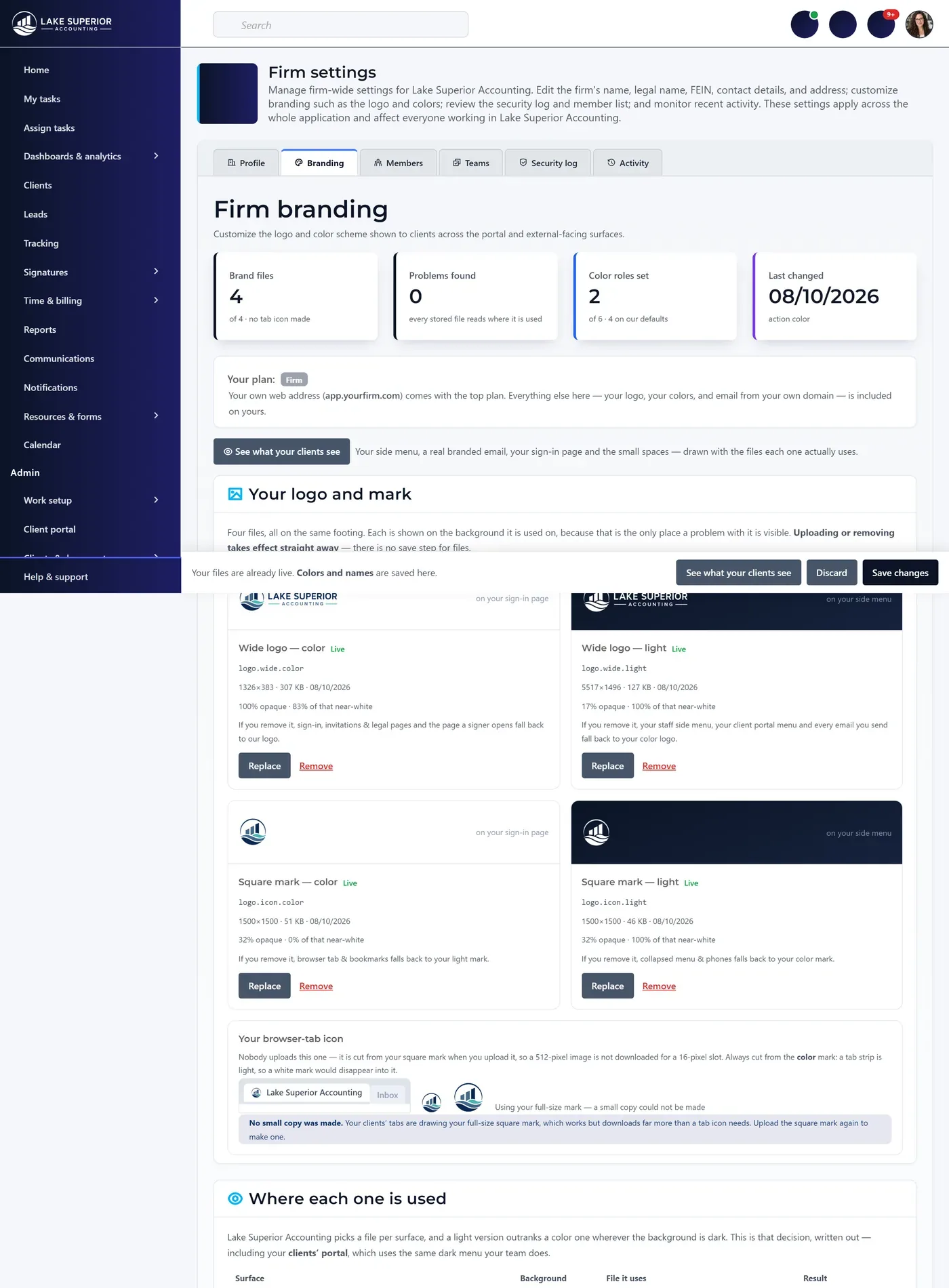
The branding screen a firm configures itself: four brand files each shown on the background it is actually used on, a table naming which file every surface draws, and five color roles each checked for readable contrast before use.
Supporting a member firm

You can enter a firm to fix something. It will always know.

Most platforms answer “can you see my data?” with an unlogged admin account. Kveldo answers it with a mechanism. Every support session is time-limited, capability-restricted, recorded, and disclosed to the firm — and the disclosure cannot be switched off by anyone, including us.

Two levels, and one is the default

View only opens anything that colleague can open and changes nothing — the barrier sits where data is written, not on hidden buttons, so a request that mutates is stopped too. Interactive re-verifies the engineer’s own authenticator before it starts, every time, and again on every extension. View-only runs 60 minutes to a four-hour ceiling; interactive runs 30 to a two-hour ceiling.

A fixed refusal list

No session, at any level, can change anyone’s password or second factor, touch the subscription or anything that moves money, delete or suspend a user, change who holds which role, alter the portal or sending domain, reach any platform administration page, or start a second session from inside one. A refused action is recorded as a refused action.

The firm’s own evidence, not ours

The person whose account was used is emailed when the session starts and when it ends. The firm’s administrators are emailed at a cadence they choose. Every session appears in their own security log with the engineer’s name, the reason in their own words, the access level, the duration, and the number of changes made. And a download button returns every session on record — seven years of them — including the date the firm was emailed about each one. If an auditor asks a member firm for its support-access history, that firm should never have to ask you for it.

Adding a firm

A new member firm starts configured, not empty.

Provisioning clones a complete, independent copy of fourteen configurable lists into the new firm — work types and their statuses, services, document form types, notification templates, welcome content, tax calendar dates, resource forms, submission statuses, tracking statuses, lead sources, custom fields and role templates with their grants.

Its own copy, permanently

Each firm receives a copy at provisioning and may change it freely afterwards. A defaults change reaches firms created after it and nobody else — no configuration you set centrally is silently in force at an existing member firm.

Its own recovery authority

Every firm has a Tenant Owner — an organization-level designation, not a role, that cannot be edited, cloned or archived away. It is why every other role is genuinely theirs to change without risking permanent lockout.

A defined way out

A firm leaving is a process rather than a delete. A deprovisioning worker releases what they left elsewhere — sender-authentication records, domain bindings — in a specified order, which is why every tenant key restricts rather than cascades.

Let’s talk about your firms.

Premium runs $699/month for a single firm on its own domain. Multi-firm operator terms — seats, AI allowance, and how the firms are billed — are quoted rather than banded.