Platform overview

One platform, not seven subscriptions held together by email.

Most small and mid-size firms run on a stack that grew by accident — a portal from one vendor, a workflow tool from another, a shared drive, a spreadsheet tracking who owes what, and a mailbox holding the rest. Kveldo is the whole of that, built as one system, where a document uploaded by a client lands in the same record the work item, the deadline and the invoice already live in.

Client portal

A modern, self-service window into a client's own records — the piece firms are most often embarrassed by.

Work tracking

Firm-configured work types, each with its own allowed statuses, on a board that filters the way you think.

AI where it pays

Statement conversion and intake extraction — the two jobs that are genuinely slow and genuinely mechanical.

Security by default

Mandatory 2FA, encrypted PII, magic-byte file validation and a full audit trail — not a premium add-on.

Two audiences, one record

Your staff and your clients see different products.

Clients never see your internal complexity — no other clients, no staff management, no internal notes. Staff never have to maintain a second copy of anything. It is one database with two front doors.

The staff suite

Everything the practice runs on, gated by a permission matrix your Administrator controls.

  • Client 360 — contacts, filers, owners, dependents, services, files, messages, notes, activity
  • Tasks and work tracking with per-work-type status rules
  • Four operational dashboards: Workflow, Clients, Billing, Tax Season
  • Monthly bookkeeping and sales tax year-grids, set inline
  • Bank statement conversion straight to QuickBooks
  • Client invoicing, employee and payroll records, reports
  • Shared calendar with recurrence and tax due dates

The client portal

Invitation-only, mobile-responsive, carrying your firm's branding rather than ours.

  • A "needs your attention" dashboard, not a firehose
  • Upload documents and respond to document requests
  • Secure two-way messaging with attachments
  • A resources library — your articles, forms, guides and tax calendar
  • Read-only calendar with iCal subscription
  • Business clients manage their own portal users
  • An AI help assistant scoped to portal help only
Bank statement conversion

A PDF statement in. A reconciled, QuickBooks-ready file out.

AI extracts and suggests; your staff verify and approve. The engine reconciles to the penny with a one-cent tolerance, and a statement cannot be accepted while it is out of balance. Categorization runs a four-tier hierarchy — a memorized payee rule first, then an exact account match, then a fuzzy match, and only then an AI suggestion drawn from that client's own Chart of Accounts.

Every result is labeled: Auto above 95% confidence, Suggested between 80 and 94, Unknown below 80 and categorized by hand. Tick "memorize" beside any account and the rule teaches itself for next month.
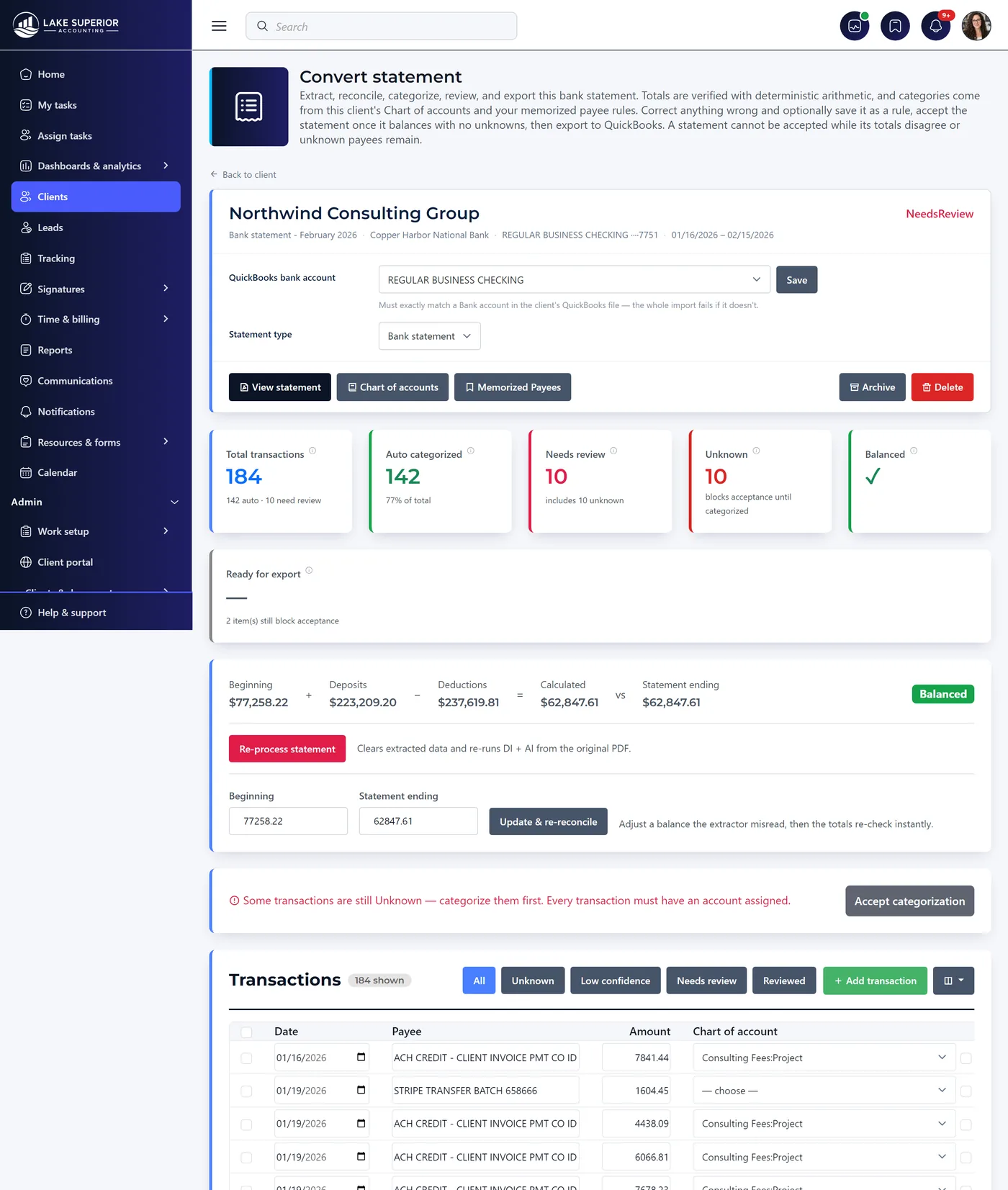
Statement conversion · review
A converted bank statement under review: 184 transactions, 142 auto-categorized, 10 needing review, 10 unknown, and the totals reconciling — beginning plus deposits minus deductions equals the statement ending balance exactly.
The workflow

Six steps, and a person signs off on every one that matters.

1

Upload the PDF

The client uploads through the portal, or your staff upload on their behalf from the Files tab.

2

Start the conversion

Reached only from the client's Accounting tab — never a global menu — so a statement cannot be processed against the wrong client.

3

Select a Chart of Accounts

Use the client's existing one in a click, or upload a new .xlsx/.csv. Charts are never shared between clients.

4

Watch it process

Extraction streams: a stage rail, a live transaction count and an elapsed clock, rather than an opaque spinner.

5

Review

Correct unknown or low-confidence rows. Add a transaction the extractor missed. Fix a misread amount and the batch re-reconciles instantly.

6

Accept, then export

Lock the statement and download as CSV, XLSX, QIF or IIF. Exports are saved to the client's Files tab and stay retrievable.

Dashboards

Four views of the practice, each one clickable through to the list behind the number.

Stat tiles, trend charts, breakdowns and a needs-attention grid. No KPI is a dead end.

Workflow

Open, due-soon, overdue and completed counts; six months of created-versus-completed; breakdowns by work type and intake method.

Clients

Totals, business versus personal, open leads and conversion rate, twelve months of new clients, and service adoption.

Billing

Invoiced, paid and outstanding, overdue count, six months of invoiced-versus-paid, and an outstanding-invoices grid.

Tax Season

The return pipeline: ready for a preparer, waiting on information, waiting on e-file forms, filed — plus what is stuck and why.

Interface standards

Every list in Kveldo is the same list.

Not "similar" — the same. Documented, testable standards mean a change that drifts fails the build rather than shipping. Your team learns one grid and knows all of them.

The data grid standard

  • Text search plus dropdowns built from the values actually present
  • Filter chips and shareable URL state that survives a refresh
  • Saved views, sticky header, live row count
  • Per-user column chooser and density control, persisted
  • CSV or XLSX export from every grid

Accessibility & preferences

  • Stat labels darkened to clear WCAG AA 4.5:1
  • Long values truncate with a tooltip, never rag the row
  • Wide content scrolls in its own container; the page never does
  • Every dropdown is a searchable combobox
  • Dates and times follow each user's own format and time zone
Under the hood

Built like infrastructure, because it holds tax data.

3,729Automated tests, every release
100%Accounts with mandatory 2FA
3Enforced isolation boundaries
7 yrsSigned-record retention
$0Per envelope, seat or page

Multi-tenant by architecture

Every tenant-owned table is classified, and the classification is the security model. Most carry a fail-closed isolation rule in the data layer itself, so it is not a filter a developer has to remember to write. Fail-closed means a connection that has not declared which firm it is acting for sees nothing — not everything. The rest are named one by one, each with a written reason: the few that must work before any firm is known, and the few entered with a single-use link. The one identity permitted to cross firms is separate, named and auditable.

Asynchronous where it counts

Statement extraction streams and reports progress instead of blocking a request. Analytics and geo-enrichment run in the background and never delay a sign-in or a page load.

A push to main is a release

CI runs build, a dependency vulnerability gate, static analysis and the full test suite on every change. Deployment publishes, packages, deploys and then smoke-tests the live URL.

See it against your own client list.

Free for 14 days. No credit card. Live in one day — we migrate your first day at no charge.